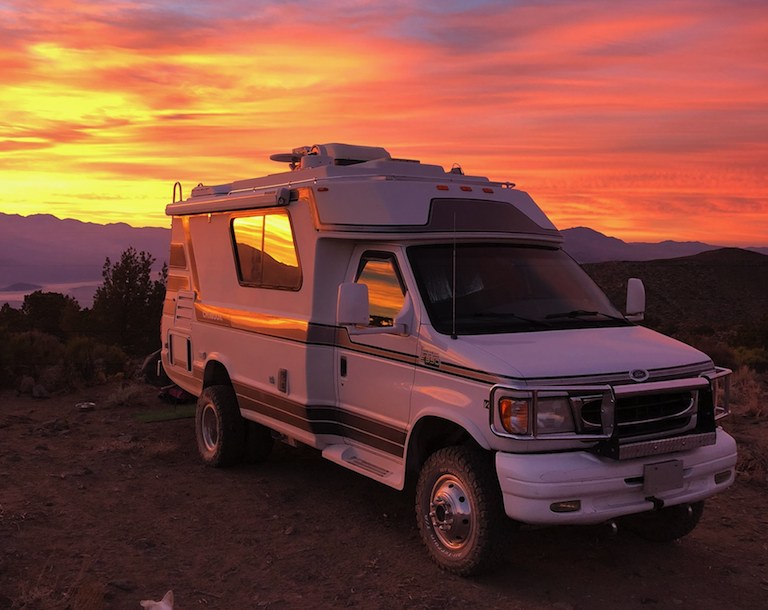

It's time for a backup cam. I'm pretty sure I'm going to go with a 7" wireless. Any suggestions on location for the monitor outside of the cup holder or dash? We use the cup holders, and I don't want that behemoth in my field of view on the dash. In theory, I suppose it could replace the rear view mirror, as that's pretty useless in our rigs. Anyone done this?
Any novel ideas, or even pictures, would be appreciated.
7" backup monitor location ideas
7" backup monitor location ideas
2001 Premier aka "Anookie"
Dallas, TX area
Dallas, TX area
Re: 7" backup monitor location ideas
The rear view mirror is actually pretty useful for us with the temperature and compass, but yeah, it is useless otherwise even with the lenses on the back door. I would like to know if there is any nice one out there that can be put on the rear view mirror mount, but no luck so far. Seems to me the most flexible way is to have a stand-along monitor on the dash. I would like to get rid of the side mirrors too (cost me $400 buck the other day when an idiot was too close to my lane with his mirror over the line and got it busted off when I passed him!) but so far, I don't think DOT approve any that I can use.
Here is one that have the marker lights mount, but I think the red one maybe is too high if I put it on the center marker light on the back.
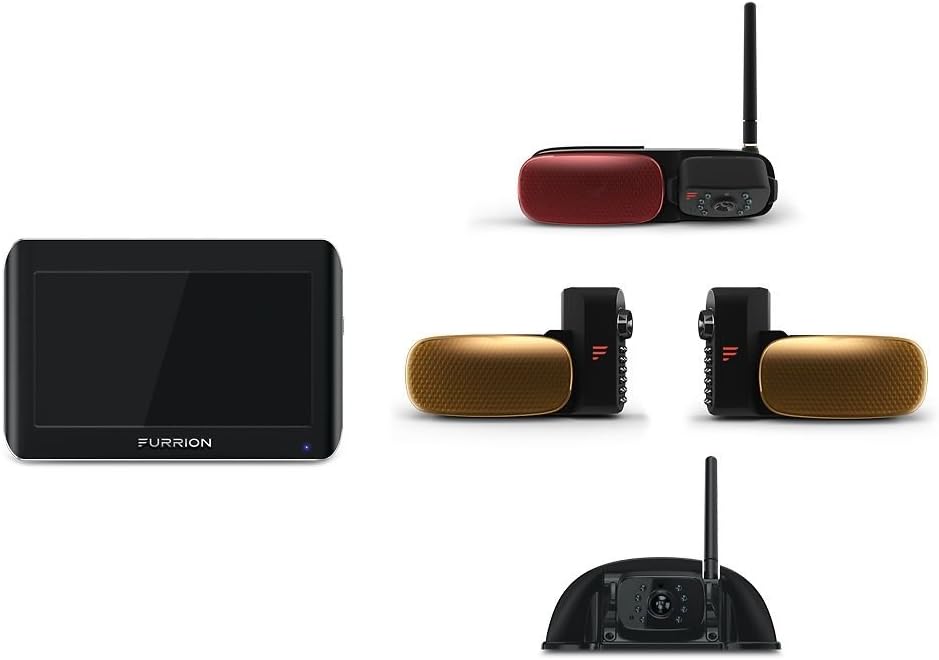
Right now, there are just way too many monitors on the dash. There is the tire pressure monitor, a ScanGauge, a GPS, and now this? I wish someone came integrate all these together and let me replace the radio unit with a infotainment unit with GPS, camera monitor, radio/CD, TPMS, OBDII, etc.
Here is one that have the marker lights mount, but I think the red one maybe is too high if I put it on the center marker light on the back.
Right now, there are just way too many monitors on the dash. There is the tire pressure monitor, a ScanGauge, a GPS, and now this? I wish someone came integrate all these together and let me replace the radio unit with a infotainment unit with GPS, camera monitor, radio/CD, TPMS, OBDII, etc.
2000 Concourse dinette, on 1999 6.8L Ford E350 Triton V-10 Chassis
-
Chinook009
- Posts: 15
- Joined: April 30th, 2020, 2:13 pm
Re: 7" backup monitor location ideas
I've 2 cents to add to this one, for what it's worth...
I just went through the same search for a solution as well and came up with this -
Look up MobArmor - they are bomber magnet mounts. I put (1) of the magnet pads on my dash next to the radio, not on the top of the dash. The mount then magnetizes to the disk that is stuck to the dash. You then have to stick a flat magnetic plate to your device or monitor that you buy (or your cell phone) and you're done. The magnet mount has magnetism on both end to make this happen. You'll see when you look them up. All the pieces you need comes in the box with the magnet mount you buy from MobArmor. The mount articulates for viewing angle changes and dealing with different lighting issue's or even for different driver preferences, it also allows you to take the monitor down if you want and hide it, or store it, or just not use it at all if you don't need/want to.
I found this to be the most flexible, ideal solution possible and to avoid permanently mounting anything to my rig.
I also went the route of buying a camera that has built in WiFi, but uses an App on my cell phone for viewing. Smaller screen, but not another monitor for a single purpose. Also my phone is not much smaller than the monitor they try and sell you in the "kits" for extra $.
I don't know, up to you, but this was the optimal solution I could come up with - and I freaking love magnets - total flexibility in use and locating.
Hope that helps.
I just went through the same search for a solution as well and came up with this -
Look up MobArmor - they are bomber magnet mounts. I put (1) of the magnet pads on my dash next to the radio, not on the top of the dash. The mount then magnetizes to the disk that is stuck to the dash. You then have to stick a flat magnetic plate to your device or monitor that you buy (or your cell phone) and you're done. The magnet mount has magnetism on both end to make this happen. You'll see when you look them up. All the pieces you need comes in the box with the magnet mount you buy from MobArmor. The mount articulates for viewing angle changes and dealing with different lighting issue's or even for different driver preferences, it also allows you to take the monitor down if you want and hide it, or store it, or just not use it at all if you don't need/want to.
I found this to be the most flexible, ideal solution possible and to avoid permanently mounting anything to my rig.
I also went the route of buying a camera that has built in WiFi, but uses an App on my cell phone for viewing. Smaller screen, but not another monitor for a single purpose. Also my phone is not much smaller than the monitor they try and sell you in the "kits" for extra $.
I don't know, up to you, but this was the optimal solution I could come up with - and I freaking love magnets - total flexibility in use and locating.
Hope that helps.
Re: 7" backup monitor location ideas
Thanks guys! Funny, I am familiar with Mob Armor, as I have their magnetic phone mount in my RZR.
https://www.cjponyparts.com/mob-armor-m ... 20Products
I did find this. NO idea how good it is. This one clips on, and you can hard wire or run the ol cig lighter cord.
https://www.tadibrothers.com/products/7 ... kup-camera
https://www.cjponyparts.com/mob-armor-m ... 20Products
I did find this. NO idea how good it is. This one clips on, and you can hard wire or run the ol cig lighter cord.
https://www.tadibrothers.com/products/7 ... kup-camera
Last edited by FatBuoy on August 19th, 2020, 1:22 pm, edited 1 time in total.
2001 Premier aka "Anookie"
Dallas, TX area
Dallas, TX area
Re: 7" backup monitor location ideas
I was wondering if they made something like that. An app for your phone. Would you mind sharing the name of the app, and the camera you bought?Chinook009 wrote: August 19th, 2020, 1:05 pm I've 2 cents to add to this one, for what it's worth...
I just went through the same search for a solution as well and came up with this -
Look up MobArmor - they are bomber magnet mounts. I put (1) of the magnet pads on my dash next to the radio, not on the top of the dash. The mount then magnetizes to the disk that is stuck to the dash. You then have to stick a flat magnetic plate to your device or monitor that you buy (or your cell phone) and you're done. The magnet mount has magnetism on both end to make this happen. You'll see when you look them up. All the pieces you need comes in the box with the magnet mount you buy from MobArmor. The mount articulates for viewing angle changes and dealing with different lighting issue's or even for different driver preferences, it also allows you to take the monitor down if you want and hide it, or store it, or just not use it at all if you don't need/want to.
I found this to be the most flexible, ideal solution possible and to avoid permanently mounting anything to my rig.
I also went the route of buying a camera that has built in WiFi, but uses an App on my cell phone for viewing. Smaller screen, but not another monitor for a single purpose. Also my phone is not much smaller than the monitor they try and sell you in the "kits" for extra $.
I don't know, up to you, but this was the optimal solution I could come up with - and I freaking love magnets - total flexibility in use and locating.
Hope that helps.
2001 Premier aka "Anookie"
Dallas, TX area
Dallas, TX area
-
Chinook009
- Posts: 15
- Joined: April 30th, 2020, 2:13 pm
Re: 7" backup monitor location ideas
I bought the camera from Falcon Electronics and the App is called F-Car - it's on the Apple and Android App Stores. Pretty basic App, but it works. Camera is HD with like 24 lights for night vision (can't recall the model) - they only have a couple options. I also chose to go with the battery power option versus wiring a camera in. Using more magnets (sold by Falcon) to mount the camera and battery to the back of the rig to a steel bar I installed. Same concept as with the magnets for the monitor - why permanently mount anything if you don't have to (just my preference). Let's me take it down when not in use and allows me to upgrade as technology changes if desired without drilling holes all over, tapping into wiring, etc.
Re: 7" backup monitor location ideas
Interesting. Mind if I keep asking?Chinook009 wrote: August 19th, 2020, 1:32 pm I bought the camera from Falcon Electronics and the App is called F-Car - it's on the Apple and Android App Stores. Pretty basic App, but it works. Camera is HD with like 24 lights for night vision (can't recall the model) - they only have a couple options. I also chose to go with the battery power option versus wiring a camera in. Using more magnets (sold by Falcon) to mount the camera and battery to the back of the rig to a steel bar I installed. Same concept as with the magnets for the monitor - why permanently mount anything if you don't have to (just my preference). Let's me take it down when not in use and allows me to upgrade as technology changes if desired without drilling holes all over, tapping into wiring, etc.
- I'm assuming you have to plan to want to see what's behind you, so need to hit the app when needed, correct? Is it pretty quick to come up?
- Does the turning of the app on, turn the camera on automatically? I ask because of battery life. Any idea how long the battery lasts in hours?
- Their site says to use the app called SWD CAMERA. Any reason you went with F-Car?
2001 Premier aka "Anookie"
Dallas, TX area
Dallas, TX area
Re: 7" backup monitor location ideas
FatBuoy, can you list the URL/links? I can't find anything on Falcon's site.... looks like they want to sell a fighter jet... 
2000 Concourse dinette, on 1999 6.8L Ford E350 Triton V-10 Chassis
Re: 7" backup monitor location ideas
www.dashcam.co And the is no “m”.chin_k wrote: August 19th, 2020, 2:19 pm FatBuoy, can you list the URL/links? I can't find anything on Falcon's site.... looks like they want to sell a fighter jet...
I ran across the site you’re talking about as well. Figured, well, we have the sports car of RVs. Why not The Fighter Jet of...

Their number is a Dallas number. I left a message today, but maybe I can just drop in for a visit/demo!
2001 Premier aka "Anookie"
Dallas, TX area
Dallas, TX area
-
Chinook009
- Posts: 15
- Joined: April 30th, 2020, 2:13 pm
Re: 7" backup monitor location ideas
Don't have all your answers as I haven't used it other than in the driveway yet. Just installed to send the wife out on the road solo, of course she didn't use it...
Battery says 10 hours of life per charge.
App comes up instantly, you just need to go to your wireless settings and select the V-something wireless signal the camera puts off.
You can set your phone to "never" turn off the display in settings. This would be another setting (besides the WiFi selection) that you would want to do before you hit the road. That way your display would not go to sleep and force you to keep using a PW or whatever to get back into your phone while driving.
It states there is a way to turn the camera on and off with voice commands, but haven't go that far and that option is not on the App. As stated, the App is basic - Record video, Recorded video, change the reverse assist lines direction and WiFi on/off, that's about it.
I just push the button on the back of the battery to power on/off at this point.
I think that's all I've got. It's not perfect, but it's close, or close enough for me. The voice command would make it pretty solid, but I'm not holding my breath that that is a real feature.
Battery says 10 hours of life per charge.
App comes up instantly, you just need to go to your wireless settings and select the V-something wireless signal the camera puts off.
You can set your phone to "never" turn off the display in settings. This would be another setting (besides the WiFi selection) that you would want to do before you hit the road. That way your display would not go to sleep and force you to keep using a PW or whatever to get back into your phone while driving.
It states there is a way to turn the camera on and off with voice commands, but haven't go that far and that option is not on the App. As stated, the App is basic - Record video, Recorded video, change the reverse assist lines direction and WiFi on/off, that's about it.
I just push the button on the back of the battery to power on/off at this point.
I think that's all I've got. It's not perfect, but it's close, or close enough for me. The voice command would make it pretty solid, but I'm not holding my breath that that is a real feature.